
Today we were unable to image one of our machines due to a Task Sequence error. Imaging was working fine since we upgraded to 2103 but then this error threw me off. I thought initially it was related to the new Task Sequence I created for 21H1 so I went ahead and double checked the deployment settings. All of the deployment settings looked fine. We have been having issues with our media drives lately so I thought I would try another flash drive but still got the same error.
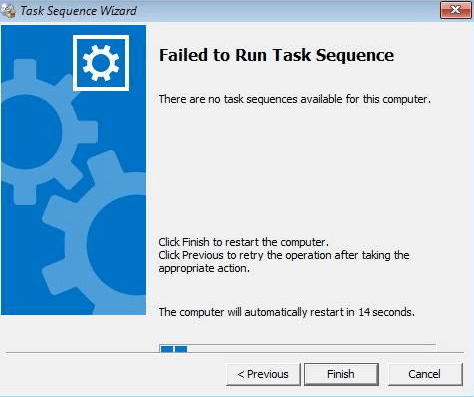
So then I decided to check the smsts.log file to see if anything was yelling at me. At first I couldn’t find any rhyme or reason on why this was failing but after some reading, I realized that the wrong machine name was in the log file.
If you search for Netbios name, it will show you the name of the machine in question. What was showing was the previous machine that we imaged. I should mention we were imaging Microsoft Surface machines using a universal dock for ethernet. This somehow must have been cached. I’m sure moving to another port may have fixed the issue as well but I actually just updated the membership in SCCM for the device collection and that fixed the issue.
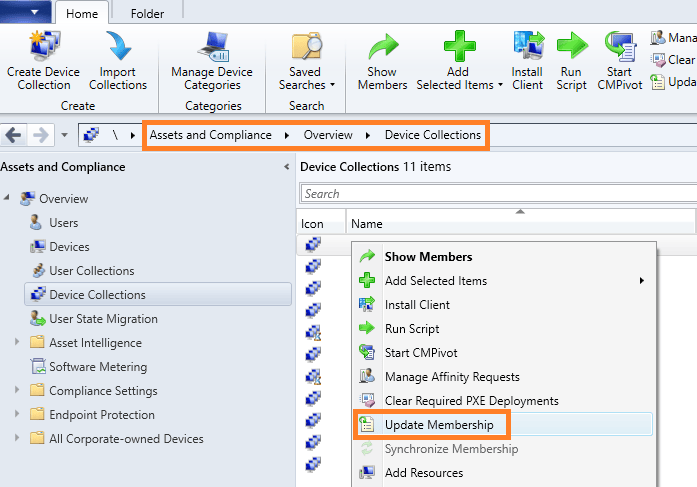
Navigate to Assets and Compliance>Overview>Device Collections and find the collection in question. Right click and select Update Membership. I did this for our Windows 10 device collection and All Unknown Computers collection as well. I waited about 10 minutes and the Task Sequence went through like normal.
I’ll need to do more research on why and how this happened but for now, this is a quick fix.

