
We are currently utilizing a single controller to manage every site with about a hundred devices across our network. Lately, we have been experiencing several crashes per week on the controller. The virtual machine hosting the controller is not crashing, only the Unifi controller. The virtual machine is running on a Hyper-V server with an Ubuntu 20.04.3 LTS OS. Originally, it was provisioned with 2 CPUs and 16GB RAM. We bumped up the specs to 4 CPU and 32GB RAM but the controller was still crashing. We noticed the CPU usage was still spiking even after we provisioned 6 CPU’s and it’s more noticeable when the application is actually opened either in the browser or the app.
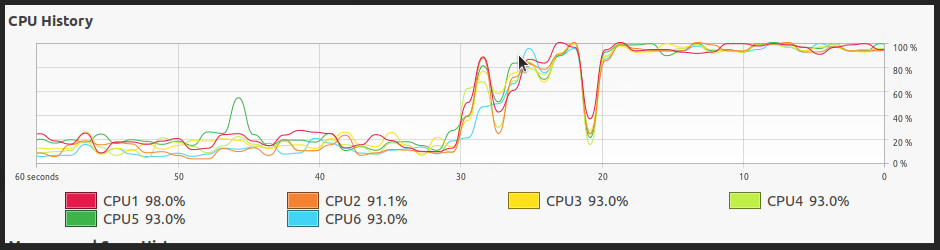
Clearly, at this point it is not related to CPU or RAM. After some researching, I found this article from Ubiquiti forums. This post says to try increasing the XMX and XMS options. Increasing the values would alter the amount of memory the Unifi network application is allowed to consume from the default 1GB to whatever you set. The reason why not having enough memory could cause high CPU usage, is because the Java Virtual Machine would be spending too many CPU cycles collecting garbage to stay within the 1 GB of memory allocated to the application.
Increasing Values
First, we need to find what file to edit and where it is located. The file we need to edit is the system.properties file. The system.properties file is located in the <unifi_base> directory.
The <unifi_base> location will vary depending on your operating system. Find <unifi_base> in the following directories:
- UniFi Cloud Key: /usr/lib/unifi
- UniFi Dream Machine: /usr/lib/unifi (you must first enter unifi-os shell)
- Debian/Ubuntu Linux: /usr/lib/unifi
- Windows: %userprofile%/Ubiquiti UniFi.
- macOS: ~/Library/Application Support/UniFi. You can get to this folder by several paths:
- Option 1: Click option+Go in Finder’s top menu bar to access Library. From there navigate to Application Support > UniFi.
- Option 2: /Applications/UniFi.app/Contents/Resources.
Note:Do not double click on UniFi.app, as it will launch the application, instead, Right Click > Show Package Contents.
So the final location of the system.properties file for Ubuntu would be /usr/lib/unifi/data/system.properties. This file can be opened and altered with any text editor. It is important to make a backup of this file before making any changes so you have something to revert to just in case any issues arise.
Once you have the file open, scroll down the bottom and you will see the xmx and xms options. Here, you can change the values by increasing in increments of 1024. I went ahead and just increased it from 1024 to 4096.
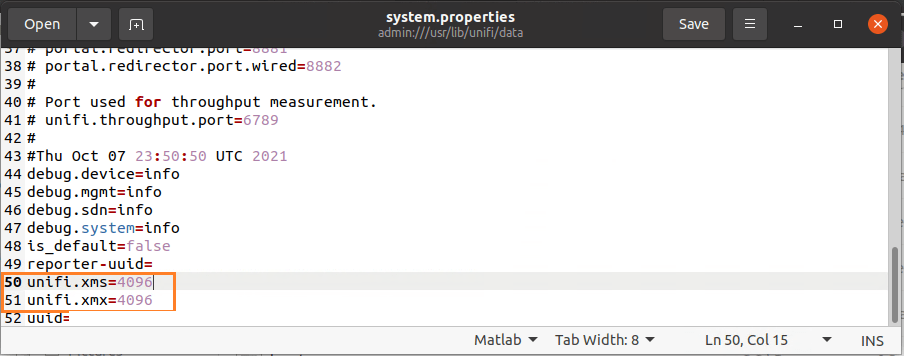
After making this change, the CPU utilization is now stable and the Unifi network application has not crashed since. Hopefully, this can help you as well if you are seeing the same symptoms.

