We recently purchased a wildcard certificate and needed to convert it from a .crt file to a .pfx file. There are many websites that provide this service but of course that opens the risk of exposing your secret key. It is best to do these types of conversions locally in your environment. We can accomplish this by using OpenSSL.
Install OpenSSL
We will be installing OpenSSL on PowerShell using a package manager for Windows called Chocolatey. To install Chocolatey, open PowerShell as an Administrator and enter the following command:
Set-ExecutionPolicy Bypass -Scope Process -Force; [System.Net.ServicePointManager]::SecurityProtocol = [System.Net.ServicePointManager]::SecurityProtocol -bor 3072; iex ((New-Object System.Net.WebClient).DownloadString(‘https://community.chocolatey.org/install.ps1’))
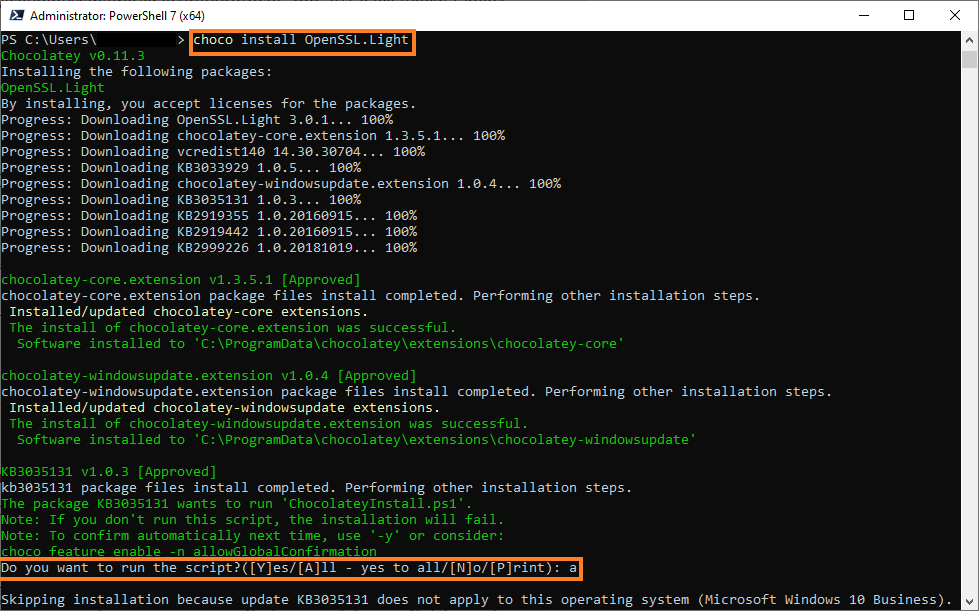
Now that Chocolatey is installed, we can install OpenSSL. Enter the following command in PowerShell to install OpenSSL with Chocolatey:
choco install OpenSSL.Light
You may be asked for permission to run the script. You can type ‘a‘ to allow all.
Once OpenSSL is installed, you will be asked to restart.
Create New Directory
At this point, we will be creating a new directory with PowerShell so it will be easier to manage newly exported certificates. In PowerShell, enter the following command:
New-Item -ItemType Directory -Path C:\certs
Copy and paste the .crt file and the private key file to that new directory. If you no longer have your private key, you will need to re-key your certificate using the certificate signing request (CSR) and save the private key to a .txt file.
Convert Certificates
There are dozens of features and options you can use with OpenSSL. We will only be focusing on one for this post. Converting a .crt file into a .pfx file. Type the following command:
openssl pkcs12 -export -out newcert.pfx -inkey privatekey.txt -in originalcert.crt
You will be asked to create a new password for the .pfx file. Once you enter the new password, the certificate will appear in the C:\certs folder.
You can now import the certificate to your server.

