In this post, we will be discussing Azure Deny Assignments. A deny assignment adds a collection of deny actions to a user, group, or service principal at a certain scope for the purpose of denying access. Deny assignments prevent users from performing certain Azure actions even if a role assignment has already permitted access.
Azure creates and manages deny assignments to protect resources from unauthorized changes. Resources can include virtual machines, network interfaces, or even Resource Groups themselves. Deny assignments are only created by Azure Blueprints and Azure managed apps to protect system-managed resources. This means, you will not be able to create your own deny assignments.
In our environment, we have several Meraki virtual MX (vMX) appliances that are deployed from Azure Marketplace. The appliances serve as auto VPN termination points for our physical MX devices. When deploying vMX to a resource group, the appliance creates a secondary managed resource group that includes the managed virtual machine and network interfaces.
When attempting to edit the Network Security group on the managed vMX virtual machine nic, I was getting the following error message:
Failed to save network interface
Failed to save network security group for network interface ‘managed-vm-nic‘. Error: The client ‘cloudadmin@company.com‘ with object id ‘object-id‘ has permission to perform action ‘Microsoft.Network/networkInterfaces/write‘ on scope ‘vmx-managed-resourcegroup/providers/Microsoft.Network/networkInterfaces/managed-vm-nic’>managed-vm-nic’; however, it does not have permission to perform action ‘Microsoft.Network/publicIPAddresses/join/action‘ on the ‘0’ linked scope(s) ” or the linked scope(s) are invalid and is blocked by deny assignments on the ‘1’ linked scope(s) ‘/subscriptions/subscription-id/resourceGroups/vmx-managed-resourcegroup/providers/Microsoft.Network/publicIPAddresses/i…
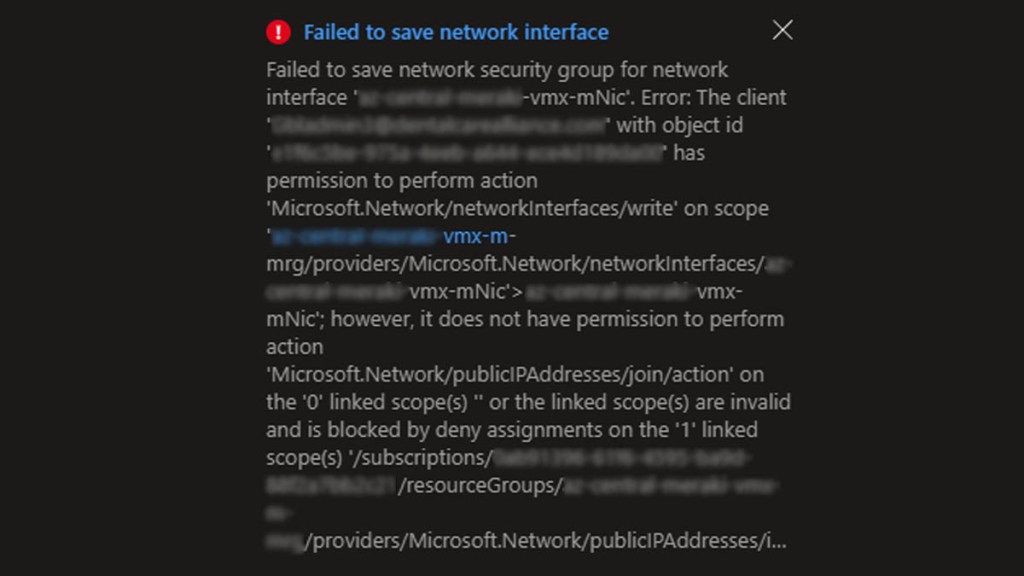
This error is basically telling us, we have the proper role assignment to make the network changes on the managed virtual machine nic, however, the actions are blocked by deny assignments.
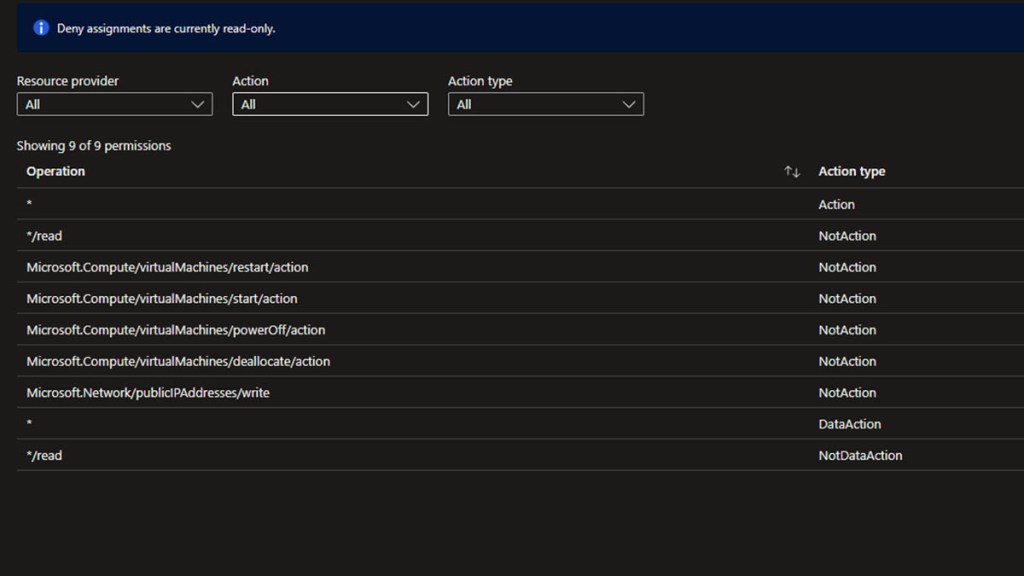
To check the deny assignments in place, navigate to the managed resource group and select Access control (IAM) > Deny Assignments > System deny assignment created by managed application > Denied permissions
Here, we can see the Microsoft.Network/publicIPAddresses/join/action permission is missing from the list.
There are several deny assignment properties. A full list can be found from Microsoft here.
For this post, we will focus on two: Action and NotAction
Permissions.Actions – An array of strings that specify the control plane actions to which the deny assignment blocks access.
Permissions.NotActions – An array of strings that specify the control plane action to exclude from the deny assignment.
If an operation is missing from the list, it will automatically be blocked by the deny assignment through implicit deny.
Since the properties are set by the managed application, we will need to delete and re-deploy the managed application. Hopefully, this will add the missing permissions that we need. This action will delete the secondary managed resource group it created and all resources within it. Proceed with caution as it will cause network disruptions.
Navigate to the original resource group and in the Overview section you will see the managed application listed as one of the resources. We will need to delete the managed application.
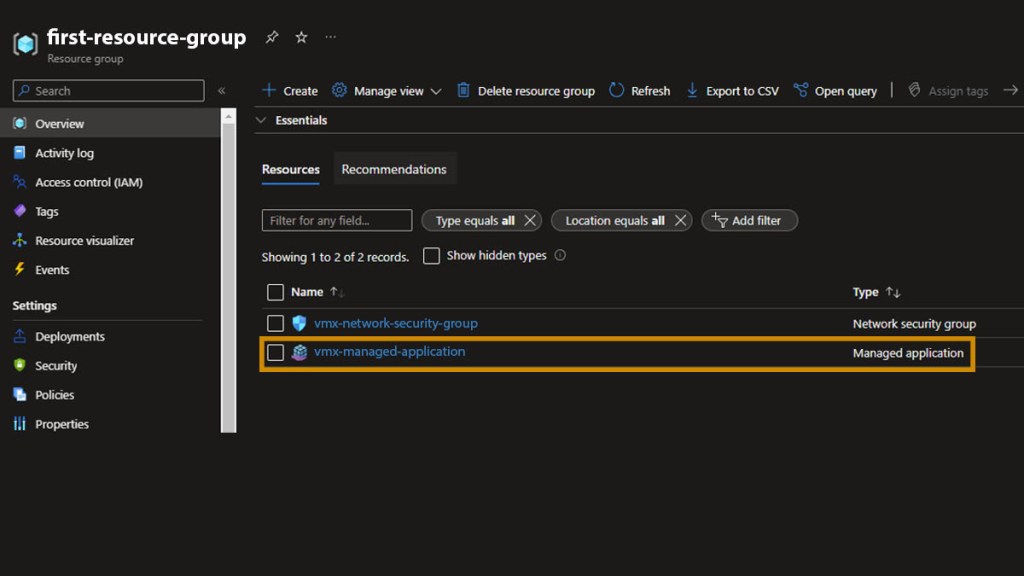
Once that completes and the managed resource group is deleted, we need to re-deploy the application from Marketplace.
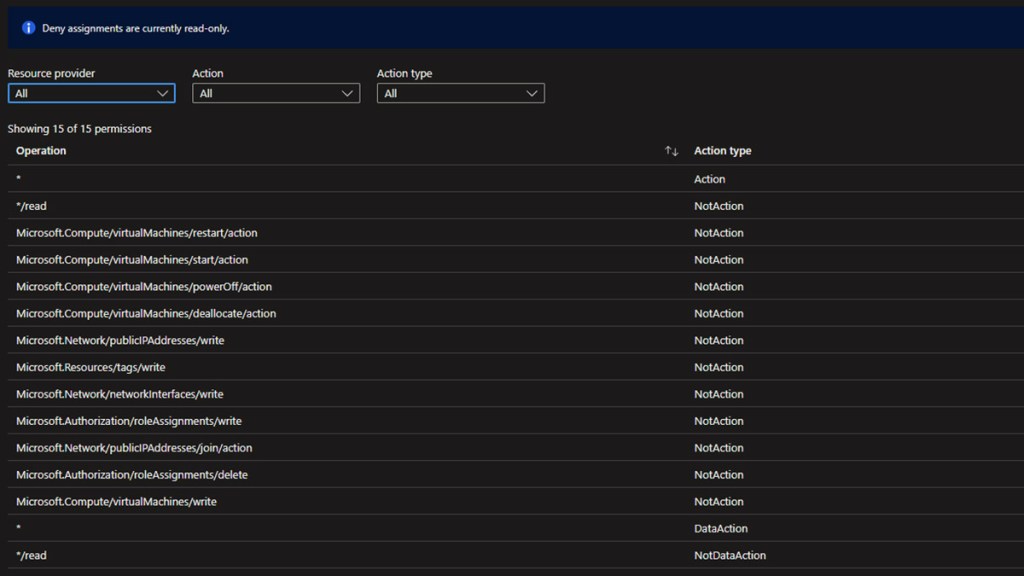
After the deployment completes and the managed resource group is recreated, navigate to the Deny Assignments denied permissions page mentioned above.
As you can see, we now have more permissions listed. The Microsoft.Network/publicIPAddresses/join/action operation is also shown with the action type, NotAction. This means we should be able to perform the previous action we were wanting to perform without any restrictions.